Loading page content
How JWT Authentication Works in Node.js
July 29, 2026•15 min read
Last updated October 29, 2026
Contents13 sections
- What is JWT?
- The old way: the server remembers you with sessions
- The new approach: letting the browser remember who you are
- The anatomy of a token
- 1. The header
- 2. The payload
- 3. The signature
- The login flow: how the server gives you a token
- The request flow: how the server verifies your token
- Access tokens vs refresh tokens
- The problem with JWTs: you can't easily log someone out
- Why logging out is harder with JWTs
- Wrapping up
Every time you visit a website or search for something online, something very simple happens behind the scenes: your browser sends a request to a server, asking for that thing you just searched. The server then searches for what you requested, finds it, and sends it right back to your browser.
That's really it. So when you type the URL of a website and search for it, you're basically telling your browser to write a request to a server saying "hey, can I have the homepage of this website?" The server reads that request, searches for what you asked, and sends back a response. Your browser opens the response and shows you the page.
Live demo
Watch a request travel from your browser to a server and back.
Browser
yoursite.com
Waiting…
Request
Response
Server
application server
Waiting for a request
Click the button below to watch what happens when you visit a website.
This back-and-forth is happening constantly, every time you search for something online, click a link, submit a form, or do anything else on a website.
But here's the surprising part: each request is treated as brand-new. The server is stateless, meaning it has no memory of the last request it received from you. It doesn't recognise you; it doesn't even recall what you asked five seconds ago unless something is specifically built to make it remember.
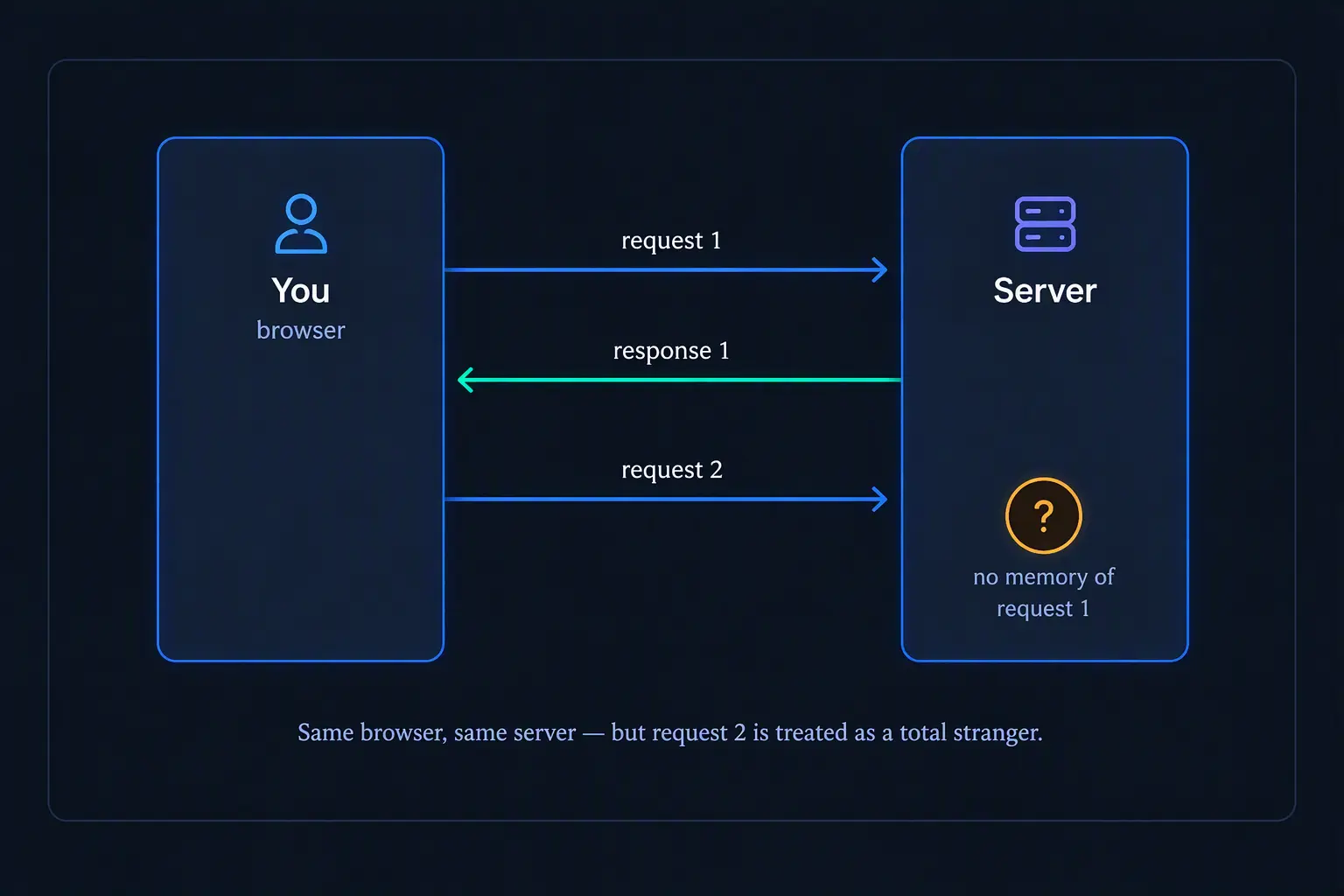
This is a very strange behaviour, if you think about it. Imagine walking into a shop and asking to buy something, and every time you speak, even just a few seconds later, the shopkeeper treats you like a complete stranger who just walked into the shop for the first time. But that’s how the Internet works by default.
So this raises an obvious question: if the server forgets you after every request, how does a site like Instagram or X (formerly Twitter) still know you're logged in as you scroll, like, and comment on other people's posts?
That question is the whole reason JWT exists.
What is JWT?
JWT stands for JSON Web Token.
Remember the problem we ended on: the server forgets you after every request. So somehow, we need to give the server a way to recognise you on your next requests. JWT is one answer to that problem. But to really understand JWT, it helps to look at how this problem was traditionally handled, and the limitations that came with it.
The old way: the server remembers you with sessions
The earliest common solution to this problem about the server forgetting you after every request was sessions.
Here's how it worked: when you logged into a site, the server would create a little record about you, something like "this is John, he logged in at 10:03am, he's authenticated," and store that record in its own memory or database. It would then hand you a small ID, called a session ID, and your browser would attach that ID to every request you made afterward.
So here's what that conversation looks like under the hood, every single time you do anything on the site: click a link, submit a form, refresh the page: "Hey server, it's me again, session ID 8842." The server checks its records, finds the one for 8842, sees that it's you, and lets you carry on as if you'd never left.
This worked, and it's still used today. But notice what it requires: the server has to keep a record for every logged-in user in a database, and it has to search for that record on every single request.
That's fine with a handful of users. But think about a site like Instagram. Millions of people are logged in at once, all sending requests every second: scrolling, posting, liking, etc. One server, no matter how powerful, can't handle that many requests alone. So companies run many servers instead, and spread incoming requests across them.
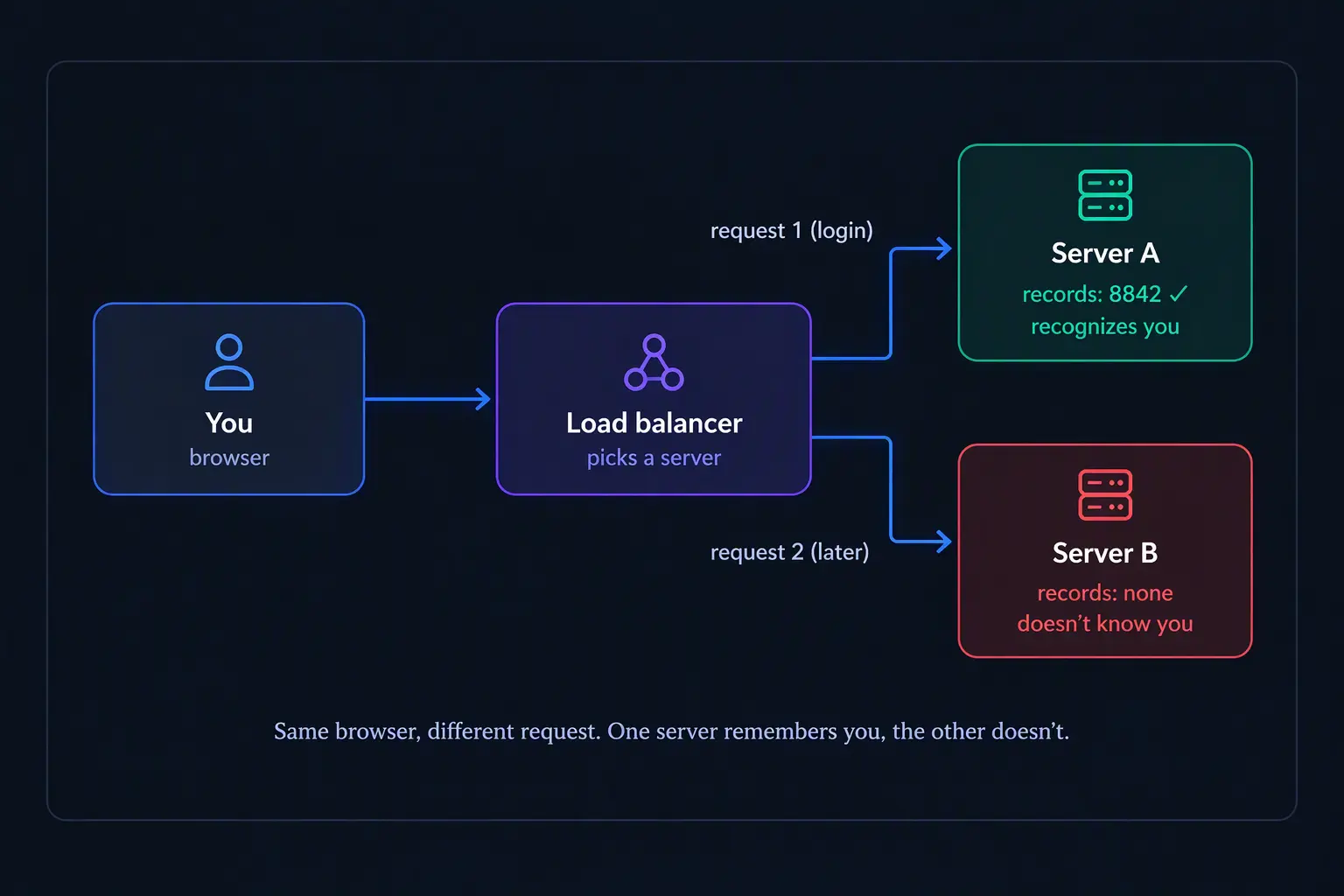
Here's the problem this creates: Let's say you log in and your session record gets created on Server A. A few seconds later you click to like an image, but this request happens to land on Server B. Server B checks its own records and finds nothing. It has no idea who you are, because your record only exists on Server A.
To fix this, every server would need to share the exact same set of records, and stay perfectly updated with each other at all times. The instant one server creates or changes a record, every other server needs to know about it too. That's genuinely difficult to build and maintain very well. It's a real headache for software engineers, and it's the exact kind of problem that got developers asking: Is there a better way to do this without needing every server to stay perfectly in sync?
The new approach: letting the browser remember who you are
This is where JWT comes in.
Instead of the server creating a record and keeping it in its own memory or database, JWT flips the whole idea around: the server writes the entire record, who you are, when you logged in, whatever else it needs to know about you, directly onto a token, then stamps it with a special signature only the server knows how to make, and hands the whole thing back to your browser.
The signature proves two things:
- That the token really came from the server
- And that nobody has changed it since. If someone tries to alter even one letter on the token, the signature breaks, and the server immediately knows something is wrong.
So the conversation now looks like this: "Hey server, it's me, here's my token." The server just checks the signature to confirm the token is genuine and untampered with, then reads who you are directly from it. That's it.
Now, notice what just disappeared: the servers no longer need to share information about every logged-in user. No Server A creating something Server B has never seen. No syncing, no real-time updates between servers. Each server can verify your token completely on its own.
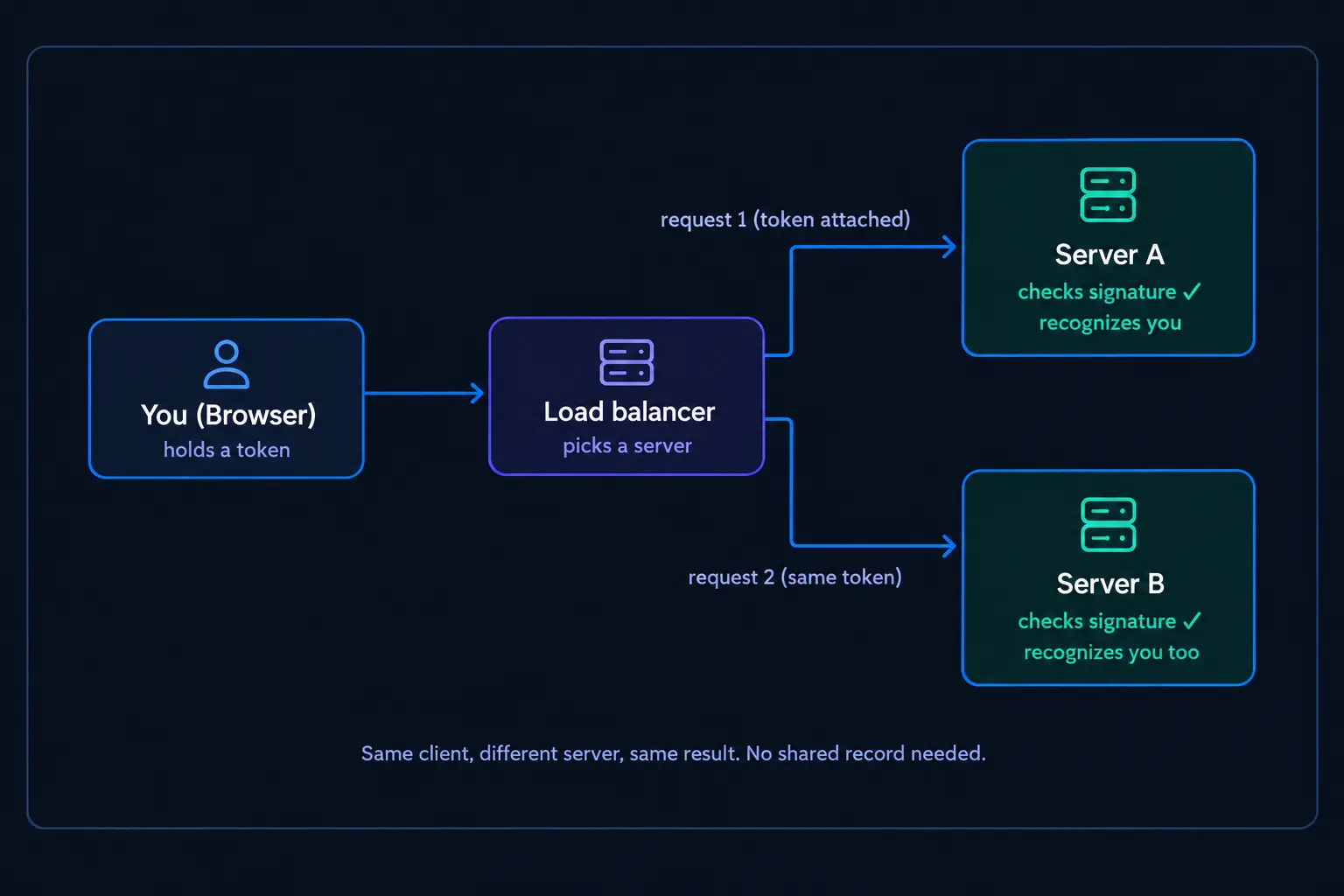
In short: JWT is a signed token that holds everything a server needs to know about you. Your browser stores it and sends it along with every request you make. Because the information lives on the token itself, any server can verify who you are just by checking the signature. No records to search, no other servers to check in with.
The anatomy of a token
Before we look at how a token gets created and used, it helps to know what one is actually like.
If you've ever seen a JWT before, you might have noticed it just looks like a long string of letters and numbers. But this isn't just random; it's made up of three distinct parts, and once you know what each part does, the whole string starts to make sense.
Here's what an actual JWT looks like:
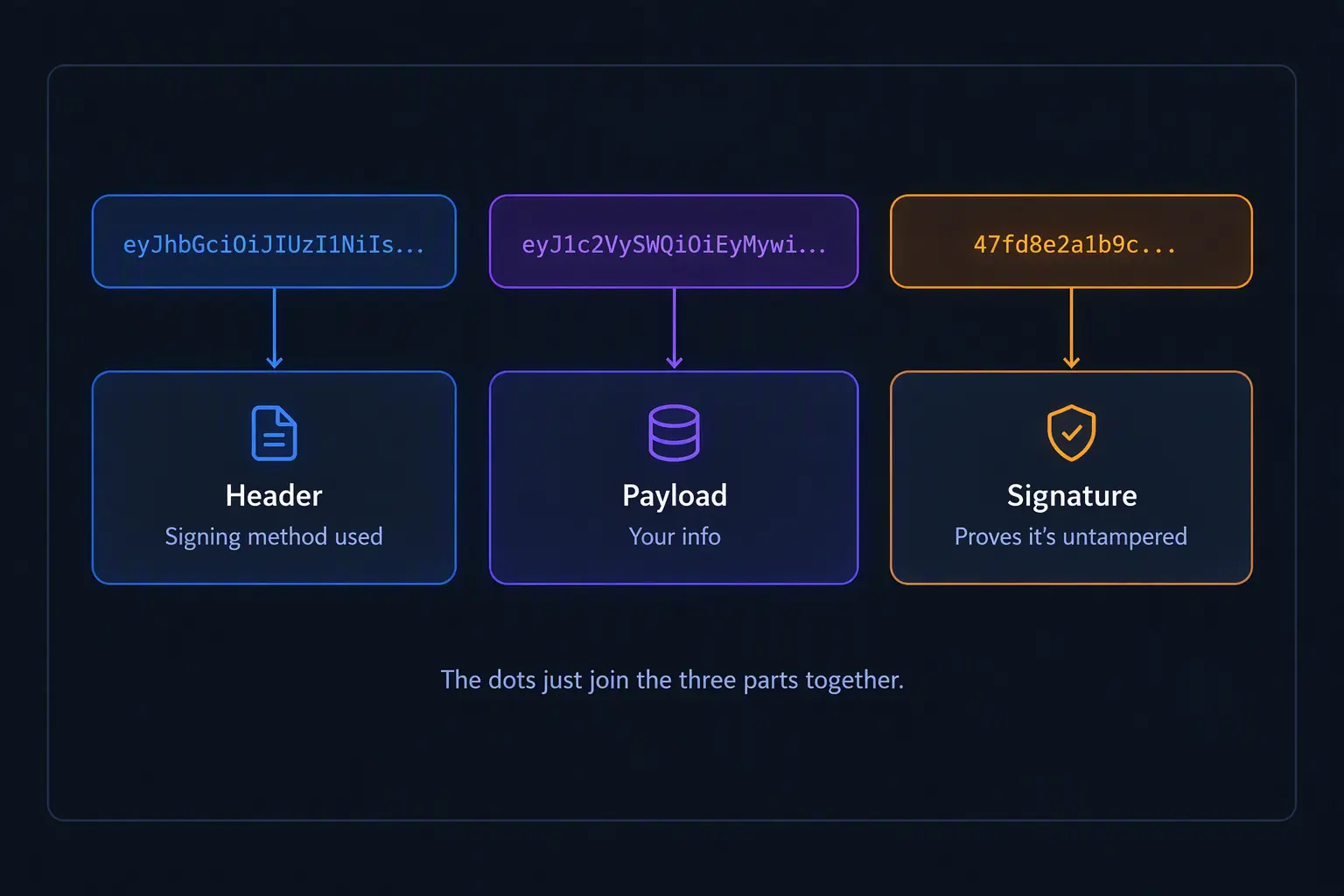
eyJhbGciOiJIUzI1NiIsInR5cCI6IkpXVCJ9.eyJ1c2VySWQiOjEyMywiZW1haWwiOiJqZXJtYWluZUBleGFtcGxlLmNvbSJ9.4f7d8e2a1b9c...At a glance, you'll notice it's really just one long string with two dots in it. Those two dots split the string into exactly three sections:
- Header
- Payload
- Signature
1. The header
This part carries a small amount of information about the token itself. Mainly, what kind of token it is, and which signing algorithm (e.gs HMAC-SHA256, often shortened to HS256) was used to create the signature.
2. The payload
This part represents your actual information. Your user ID, your email, maybe your role, when the token was issued, when it expires. Whatever the server decided to include when it built the token.
Here’s what confuses people the first time they hear it: the payload is not encrypted; it’s just encoded. This means that anyone who gets hold of the token can decode the payload and read exactly what’s on it, in plain text.
Try it yourself: paste any JWT into a site like jwt.io, and you’ll see the payload displayed as plain, readable JSON.
3. The signature
The server creates the signature by taking the header and payload, running them through a signing algorithm, and combining the result with a secret key that only the server knows.
If even one character in the header or payload changes, the signature changes completely too. So when the server later receives the token back, it doesn't need to "remember" you.
It just takes the header and payload again, signs them with its secret key, and checks whether the result matches the signature already on the token. If it matches, the token is genuine and untouched. If it doesn't, the server knows immediately that something's wrong and rejects your request.
So, the header says what kind of token this is, the payload says what information the token carries, and the signature is what allows the server to verify that the token is genuine and unchanged.
That’s the entire anatomy of a JWT.
The login flow: how the server gives you a token
So what actually happens the moment you type in your email and password and hit "log in"?
Your browser sends your email and password to the server as a request. The server checks that email and password against whatever it has stored in a database, to make sure they're correct and belong to a real account.
If they don't match, the server rejects the login attempt and sends back an error message telling you that the credentials are incorrect.
But if they do match, the server still won't remember you on your next request. So it gives you a token, you'll show it every time you make a request.
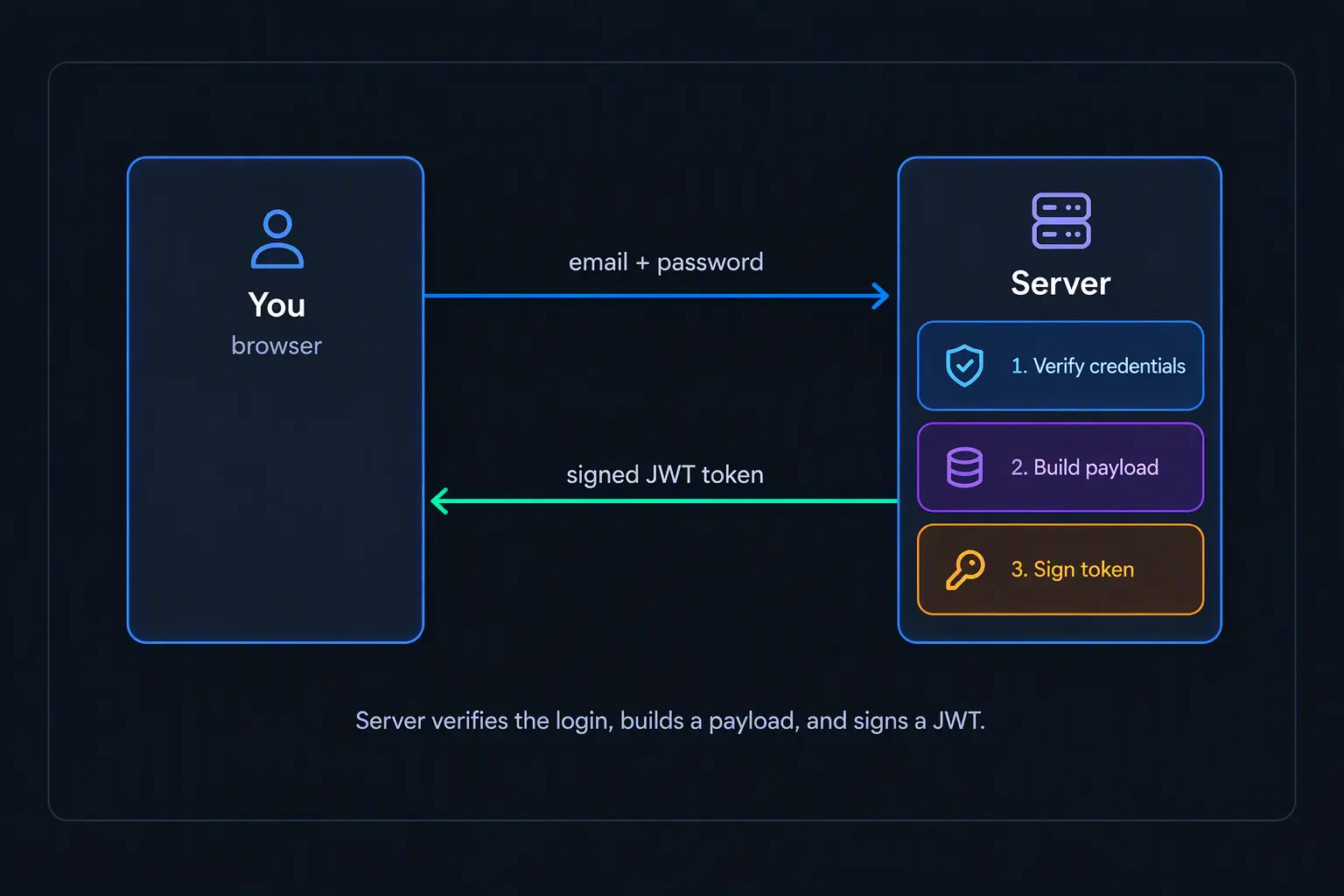
The request flow: how the server verifies your token
So you've logged in, and your browser now has a token stored. What happens on every request after that?
From here on, your browser attaches the token to every request it sends.
The server's first job, before doing anything else with a request, is to check that the token is genuine. This check usually happens in a middleware, a small piece of code that runs on every incoming request before that request is allowed to actually do anything.
That middleware pulls the token out of the request, signs the header and payload again using the server's secret key, then compares the result to the signature already on the token.
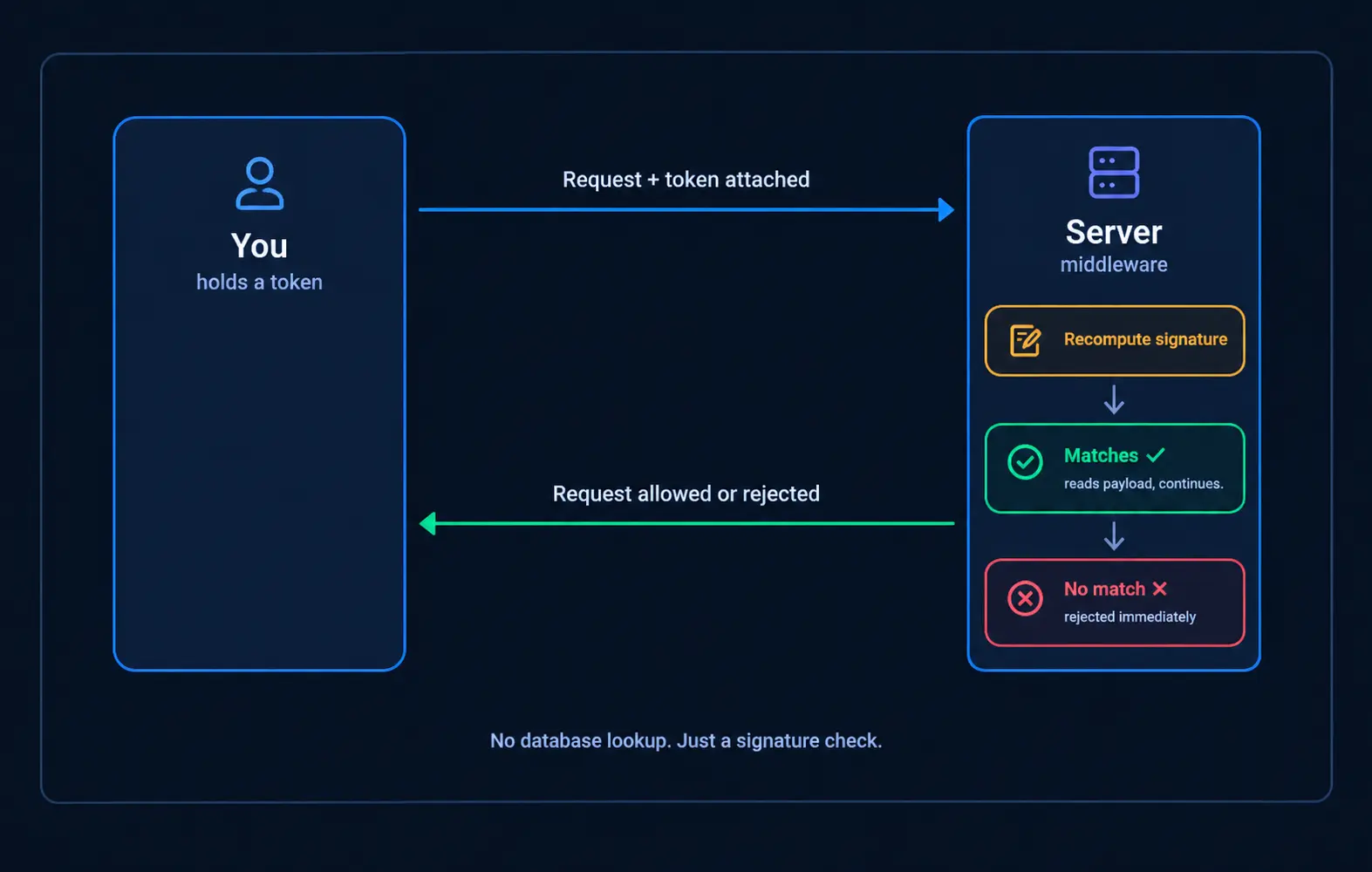
If they match, the server knows the token is genuine and hasn't been modified. It can now safely read the payload to find information about the user, such as their user ID or role, and use that information to decide what they are allowed to do.
If they don't match, or the token is missing or expired, the request gets rejected immediately. Whatever you were trying to do, load a page, post something, doesn't happen.
Access tokens vs refresh tokens
By now, every time we’ve said “the token,” we actually meant a specific kind of token called an access token. It’s the one your browser has been carrying around and attaching to every request, and it’s what the server checks to know who you are.
Here’s something you should know: a token isn’t meant to last forever. When the server first builds a token, it also decides how long that token should remain valid. It can be an hour, a day, whatever the website or application is comfortable with. Once that time is up, the token stops working entirely. If you try to use it after that point, the server will look at it, see that its expired, and reject it.
So why would a token ever expire at all? Wouldn’t it be more convenient if, once you logged in, your token just worked forever?
The answer comes down to risk.
A token is really just proof and if someone else ever gets hold of your token (through a stolen device, or hacking), they can use it to act as you, for as long as that token remains valid. Giving a token a short lifespan like, fifteen minutes, or an hour limits how much damage a stolen token can do. Once it expires, it’s worthless.
However, this creates an obvious problem: if your token expires every hour, does that mean you have to log in again, every single hour? That would be a miserable experience for anyone using the website.
This is where a second kind of token comes in: refresh token.
A refresh token is longer-lived than an access token. It can sometimes last for days or even weeks. Its only job is to get you a brand-new access token, without you needing to type in your email and password again. It’s usually stored more carefully than the access token too, often in a place ordinary JavaScript on the page can’t easily reach (to reduce the risk of it being stolen).
So here’s how the two work together: when you first log in, the server hands you both an access token and a refresh token.
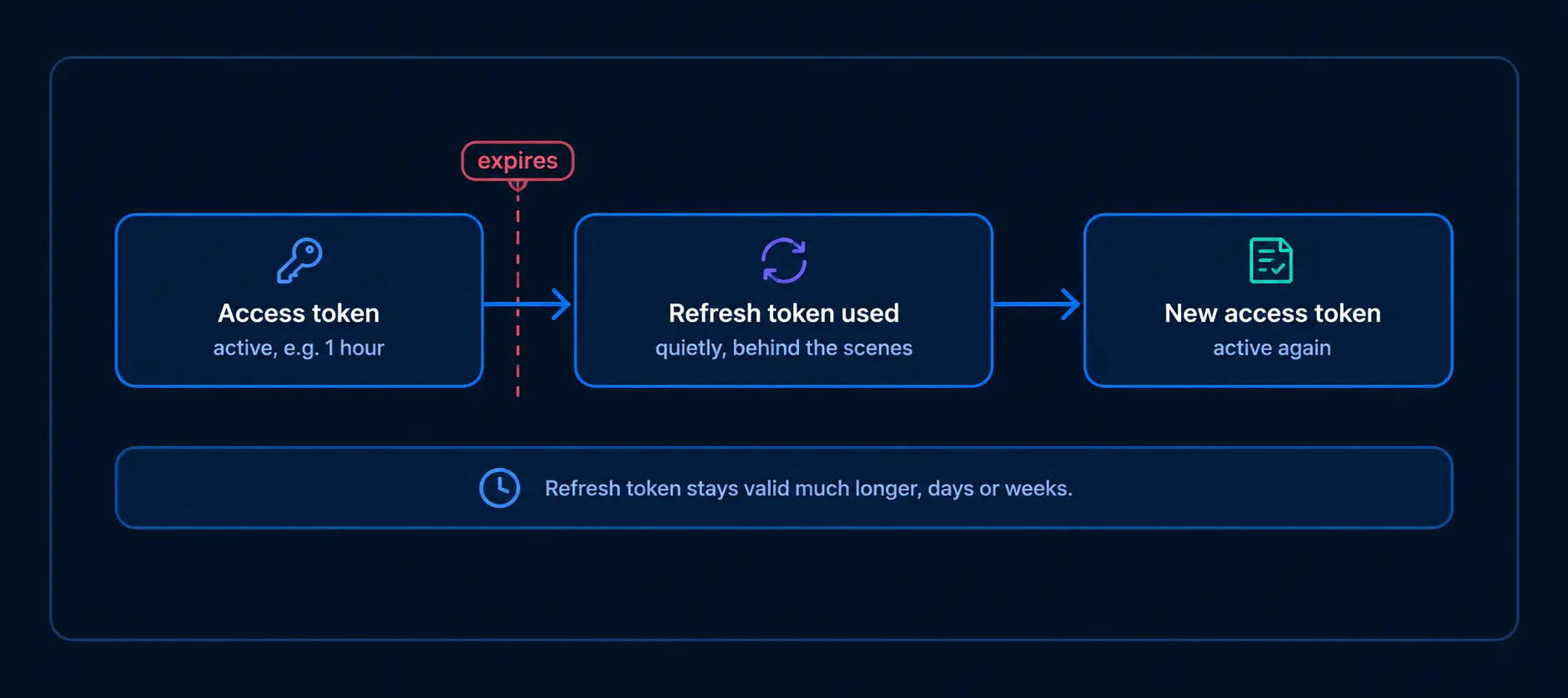
You use the access token as normal, on every request, until it eventually expires. When that happens, instead of logging in again, your browser quietly sends the refresh token to the server, which checks that refresh token to see if it’s valid and issue a brand-new access token.
A refresh token is only ever handed out by the server at two moments:
- When you log in with your real email and password
- Or when a valid refresh token is used to request a new access token.
So an attacker who only has your access token can act as you for a while, but the moment that token expires, they’re locked out for good. They will never be given a refresh token by the server, because they don’t have your email and password to get one.
So together, the two tokens balance each other out: an access token that's short-lived enough to limit damage if it's ever stolen, and a refresh token that keeps you logged in for a long time without repeatedly entering your email and password.
The problem with JWTs: you can't easily log someone out
Everything so far has made JWTs sound almost too good to be true.
No database lookups, no shared memory between servers, just a signature the server can check on its own.
But there’s a problem hiding underneath all of that.
Why logging out is harder with JWTs
Think about what “logging someone out” actually means with sessions (the old approach). The server just deletes that person’s record from its database. The next request they send has nothing to match against, so the server no longer recognises them.
Now think about what “logging out” actually does with a JWT. Clicking “log out” here does not make your access token stop working. It can’t; the server never stored that token anywhere in the first place, so there’s nothing to go delete. As long as an access token hasn’t expired yet, and its signature still checks out, the server has no way of knowing it’s “supposed” to reject it.
So what does logging out actually do, then? Two things:
- Your browser deletes its own copy of the access and refresh tokens, so it stops sending them on future requests.
- And separately, the server revokes the refresh token, since that's the one piece of this the server actually keeps track of.
But notice what this doesn’t cover. If a copy of your access token already exists somewhere else, let’s say, it was stolen few moments ago, logging out on your own device does nothing to that stolen copy. The server doesn’t know a theft happened. It just clears your own browser and revokes the refresh token. The attacker’s copy of the access token keeps working, completely unaffected, for as long as that token remains valid.
This is exactly why keeping access tokens short-lived matters so much. It’s not only about limiting general damage from a stolen token.
It specifically solves one important problem: logging out cannot take back an access token that has already been stolen. The server can clear the tokens from your own browser and cut off future refresh tokens, but a stolen access token will continue working until it expires.
Wrapping up
Let's go back to the question that kicked off this whole article: if the server forgets you the moment a request completes, how does it still recognize you on subsequent requests?
By now, you've seen the full picture. Instead of relying on the server to keep a record of you, JWT flips the problem around entirely. It gives you a signed piece of proof, and any server can check whether that proof is genuine or not on its own.
None of this makes JWT the "correct" answer for every application, and it is not a replacement for sessions in every situation either. It comes with a tradeoff, just like most things in software.